The first bot I ever connected to the Binance API lost me $340 in about six hours. Not because the strategy was bad — because I fat-fingered a config file and the bot was sizing positions off my total balance instead of a fixed allocation. That mistake taught me something no tutorial ever mentioned: the API itself is the easy part. The setup around it — permissions, security, position sizing, error handling — is where accounts get wrecked. This guide covers everything I wish someone had told me before I generated my first API key: how to create keys safely, which permissions to enable (and which to never touch), how rate limits actually work, and how to structure your first automated trades with real numbers. If you want to move beyond clicking buy and sell buttons and start trading Binance programmatically, this is the setup process that has kept my keys secure and my bots running for years.
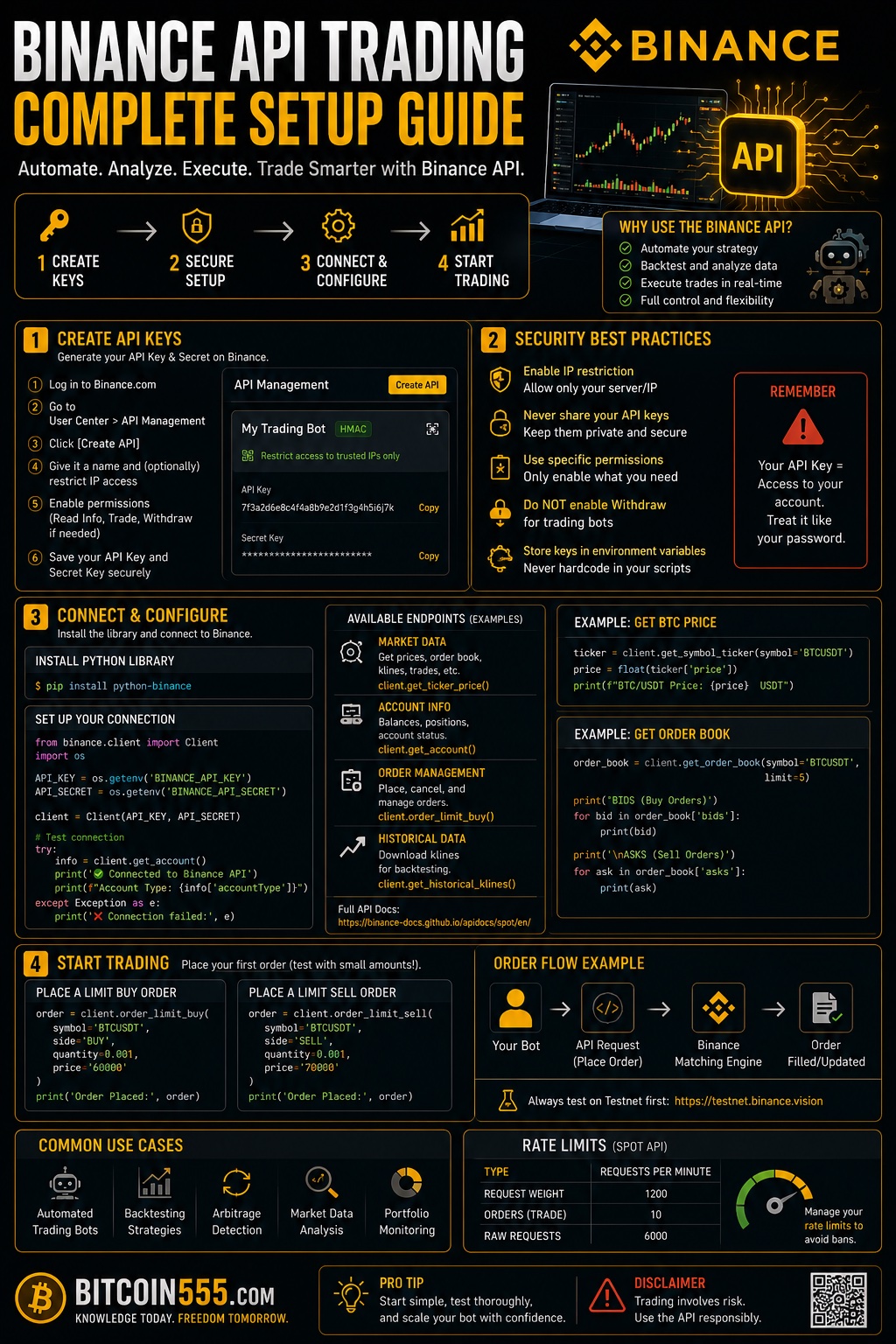
Why Trade Through the Binance API Instead of the Interface
The Binance web and mobile interfaces are fine for discretionary trading. But the moment you want consistency — same entry logic, same position sizing, same stop placement, every single time — you run into the limits of human execution. You sleep. You hesitate. You revenge trade. Code does none of these things.
Here's what API trading actually gives you in practice:
- Speed and precision: An API order executes in tens of milliseconds. Manually, you're looking at 5–15 seconds minimum from decision to fill. On a volatile breakout, that gap can be 0.3–0.8% of slippage — which on a $5,000 position is $15–40 given away per trade.
- 24/7 execution: Crypto doesn't close. A bot watching for your setup at 3 AM catches trades you'd never see.
- Discipline enforcement: The bot doesn't widen stops because it "feels like the trade will come back." This alone improved my results more than any strategy tweak.
- Backtesting continuity: The same code that backtests your strategy can execute it live, which reduces the gap between simulated and real performance.
What API trading does not give you: an edge. A bad strategy executed perfectly is still a bad strategy — it just loses money more efficiently. I've watched people spend three months building beautiful infrastructure around a strategy they never properly backtested. Get the strategy right first, then automate it.
Creating Your Binance API Keys Step by Step
Before anything else: complete identity verification on Binance and enable two-factor authentication (an authenticator app, not SMS). Binance won't let you create API keys without 2FA, and you shouldn't want to anyway.
Here's the exact process:
- Log into Binance and navigate to your profile icon, then API Management.
- Click "Create API" and choose System generated (HMAC keys). There's also an option for self-generated Ed25519 keys, which are more secure for advanced users, but HMAC is the standard most bots and libraries expect.
- Name the key descriptively. Not "key1" — use something like "grid-bot-btcusdt" or "portfolio-tracker-readonly". When you have five keys running, you'll thank yourself.
- Complete the security verification (2FA code plus email confirmation).
- Copy both the API Key and the Secret Key immediately. The secret is shown exactly once. If you lose it, you delete the key and start over — there is no recovery.
Store the secret in a password manager or, better, in an encrypted environment variable file on the machine running your bot. Never in a plain text file on your desktop, never in a Google Doc, and absolutely never in code you push to GitHub. Automated scanners crawl public repositories for leaked Binance keys constantly — leaked keys with trading permissions get exploited within minutes, usually through wash-trading illiquid pairs to drain your balance into the attacker's orders.
API Permissions and Security: The Settings That Save Accounts
This is the section people skim, and it's the one that matters most. When you create a Binance API key, every permission is off by default except Enable Reading. Here's how I configure keys, and why:
Permission checklist
- Enable Reading: Always on. This lets your bot see balances, open orders, and trade history. Harmless on its own.
- Enable Spot & Margin Trading: On only for keys that actually execute trades. If you're just tracking your portfolio, leave it off.
- Enable Withdrawals: Never enable this. Ever. No legitimate trading bot needs withdrawal access. Any service asking for it is either dangerously designed or an outright scam. This is non-negotiable — a compromised trading key can hurt you, but a compromised withdrawal key can empty you.
- Enable Futures: Only if you trade derivatives, and only after you've run the strategy on spot or testnet first. Leverage amplifies bot bugs the same way it amplifies profits.
IP whitelisting is not optional
Binance lets you restrict an API key to specific IP addresses. Do it. If your bot runs on a VPS with a static IP (a $5–10/month server from any major provider works), whitelist that IP only. Now even if your keys leak, an attacker can't use them from their machine.
There's a second reason this matters: unrestricted keys with trading permissions are automatically deleted by Binance after 90 days of no use, and unrestricted keys expire faster in general. IP-restricted keys are treated as more trustworthy by the system. If your bot mysteriously stops working after a few months, an expired unrestricted key is a common culprit.
Separate keys for separate jobs
I run one read-only key for my portfolio dashboard, and separate trading keys per bot. If one bot misbehaves or one key leaks, I kill that key without touching anything else. Keys are free — use as many as you need (Binance allows up to 30 per account).
One more thing on security architecture: your Binance account should hold trading capital only. Long-term holdings don't belong on any exchange, no matter how well you've configured your keys. I keep my core Bitcoin position on a Ledger hardware wallet, completely disconnected from any API. The exchange is a workshop, not a vault — a compromised API key can only damage what's actually sitting on the exchange.
Connecting Your First Bot: Testnet, Libraries, and First Orders
You have keys. Now don't point them at your real account yet.
Start on the Spot Testnet
Binance runs a Spot Testnet — a full simulation of the exchange with fake funds. Create separate testnet keys there and run your bot against it for at least a week. This catches the boring but fatal bugs: wrong decimal precision on order sizes, timestamps out of sync, orders rejected for violating minimum notional value. Every one of these bugs is free on testnet and expensive live.
Pick a maintained library
Unless you enjoy writing HMAC signature code by hand, use an established library. For Python, python-binance and CCXT are the standards; CCXT has the advantage of working across a hundred-plus exchanges with one interface, which matters if you ever want to expand. For Node.js, the official Binance connector or CCXT again. If you can't code at all, platforms like 3Commas, Cryptohopper, or Pionex-style grid tools connect to your Binance keys — just apply the same permission rules (no withdrawals, IP restrictions where supported).
The minimum viable first script
Your first live script should do exactly three things:
- Fetch your account balance and print it (confirms authentication works).
- Fetch the current price of one pair, e.g. BTC/USDT.
- Place a limit order far from the market — say, a buy 15% below current price — then cancel it.
That last step is deliberately safe: the order will never fill, but it proves your full order lifecycle (place, query, cancel) works end to end. Only after this runs cleanly do you let real logic touch real money.
Sync your clock
Binance rejects requests whose timestamp drifts more than a small window from server time (the dreaded error -1021). Run NTP time synchronization on your server, or fetch Binance's server time and offset your requests. This single issue accounts for a huge share of "why is my bot broken" posts.
A Real Example: Automating a Simple Breakout Strategy With Actual Numbers
Theory is cheap, so here's how a concrete automated trade looks with proper risk management baked into the code. Assume a $10,000 spot account and a rule of risking 1% per trade — $100 maximum loss.
The setup
Strategy: buy a breakout above a consolidation range on BTC/USDT, stop below the range, target 2R.
- Entry trigger: price closes above resistance at $60,000 on the 4-hour candle. Bot places a limit buy at $60,050 (small buffer to improve fill odds).
- Stop loss: below range support at $58,850 — that's $1,200 of risk per BTC, or 2% below entry.
- Position size calculation (this is code, not judgment): risk amount ÷ stop distance = $100 ÷ $1,200 = 0.0833 BTC, roughly a $5,000 position.
- Take profit: 2R target at $62,450 ($2,400 above entry). Potential gain: ~$200. Risk-to-reward: 1:2.
How the bot executes it
Once the entry fills, the bot immediately places an OCO order (One-Cancels-the-Other) — a limit sell at $62,450 paired with a stop-limit sell triggered at $58,850. Binance's OCO support via the API is one of its best features for spot traders: your exit bracket exists on the exchange itself, so even if your server crashes, your stop is live. Never rely on your bot being online to fire a stop loss. Server outages happen; I've had a VPS reboot mid-trade, and the exchange-side OCO is what saved the position from becoming an accidental bag-hold.
The honest math
With a 1:2 R:R, this strategy only needs to win about 40% of the time to be meaningfully profitable after fees. In my experience, simple breakout bots on liquid pairs win 35–45% of trades depending on market regime — which means you will regularly lose four or five trades in a row. At 1% risk per trade, a five-trade losing streak costs roughly 5% of the account. Annoying, survivable. At 5% risk per trade, that same streak is a 23% drawdown, and most people abandon the bot right before it recovers. Position sizing is the difference between a bot you can run for years and one you delete in a month.
Worth noting: not every automated strategy needs to be a trading strategy. One of the most reliable uses of the Binance API is a simple accumulation bot that buys a fixed dollar amount of BTC on a schedule — automated dollar cost averaging with zero emotion involved. If that appeals to you more than active trading, run the numbers through our free DCA calculator to see what consistent scheduled buying has historically looked like, then move those accumulated coins off the exchange to your Ledger periodically.
Rate Limits, Order Types, and Execution Details That Bite Beginners
Binance enforces rate limits measured in "request weight" per minute and orders per second/day. The practical rules:
- Don't poll prices in a tight loop. Hammering the REST API for price updates will get you HTTP 429 warnings and then a temporary IP ban (418 errors). Use WebSocket streams instead — they push live price and order updates to you with zero request weight.
- Respect minimum order rules. Every pair has a minimum notional value (commonly around $5 equivalent on major spot pairs), a tick size for price, and a step size for quantity. Sending 0.083333333 BTC when the step size allows 5 decimals gets your order rejected. Fetch exchange info once at startup and round accordingly.
- Understand order types. Market orders guarantee fills but pay taker fees (0.1% standard, less with BNB discount or VIP tiers) and eat slippage. Limit orders can earn maker fees but might not fill. For a $5,000 position, the difference between maker and taker execution is a few dollars per trade — trivial once, meaningful over 500 trades a year.
- Handle partial fills. A limit order can fill 60% and sit. Your code must track actual filled quantity, not intended quantity, or your exit orders will be sized wrong.
- Log everything. Every request, every response, every error, with timestamps. When a trade goes wrong at 4 AM, logs are the only witness.
Common Mistakes That Blow Up API Traders
I've made most of these personally. Learn from my tuition fees:
- Enabling withdrawal permissions. Covered above, repeated because it's the one that turns a bad day into a total loss.
- Committing keys to Git. Even a private repo you later make public. Use environment variables and a .gitignore from day one.
- No kill switch. Every bot needs a maximum daily loss limit that halts all trading. Mine stops after -3% on the day. A bug that loops market orders can destroy an account in minutes without one — this is exactly how my $340 lesson happened, and I got off lightly.
- Sizing off total balance dynamically without caps. If your bot reads the full balance and a deposit lands mid-session, position sizes silently double. Use fixed allocations per bot.
- Skipping testnet because "the code looks right." Code always looks right until it meets a live order book.
- Overfitting a backtest, then trusting it live. A strategy showing 300% annual returns in backtest with parameters tuned to perfection will almost always disappoint live. If small parameter changes destroy the backtest results, the edge isn't real.
- Trading illiquid pairs. Bots amplify slippage problems. Stick to top-20 volume pairs until you understand order book depth.
- Keeping everything on the exchange. Profits and long-term holdings should flow off Binance to cold storage on a schedule. A hardware wallet like Ledger costs less than one bad trade.
- Ignoring fees and taxes in the strategy math. A scalping bot averaging 0.15% profit per trade paying 0.1% taker fees each way is a slow donation to Binance. Model fees into every backtest.
Frequently Asked Questions
Is Binance API trading safe?
The API itself is as safe as your key hygiene. With withdrawals disabled, IP whitelisting enabled, separate keys per application, and secrets stored properly, the realistic attack surface is small. Most "API hacks" you read about trace back to leaked keys with excessive permissions or third-party platforms that were compromised. The bigger risk to your money is usually your own strategy and code bugs, not attackers.
Do I need to know how to code?
No, but it helps enormously. No-code platforms (grid bots, DCA bots, signal-followers) connect to your Binance API keys and handle execution. The trade-off is less control and platform fees, plus you're trusting a third party with trading permissions. If you go this route, use a dedicated API key for that platform only, so you can revoke it instantly. If you can learn even basic Python, python-binance or CCXT will pay for the effort within months.
How much money do I need to start API trading?
Technically, enough to clear minimum order sizes — around $50–100 makes testing realistic. But to run a strategy risking 1% per trade with meaningful position sizes, $1,000–2,000 is a practical floor. Below that, fees and minimum notional constraints distort the math. Start small regardless: your first live month is really a paid extension of testing.
Can my API keys expire or stop working?
Yes. Keys without IP restrictions face stricter lifecycle rules and can be auto-deleted after inactivity. Keys also break when you change account security settings (password resets disable API keys for a period as a protection measure). Build your bot to detect authentication failures and alert you rather than silently dying.
Should I run my bot on my home computer or a server?
A VPS, almost always. Home connections drop, laptops sleep, power flickers. A basic cloud server with a static IP costs $5–10 per month, gives you a stable whitelist-able IP, and runs 24/7. Pick a region with low latency to Binance's servers if execution speed matters for your strategy; for anything on 1-hour candles or slower, it doesn't.
Final Thoughts: The API Is a Tool, Not an Edge
Setting up Binance API trading properly takes an afternoon: create restricted keys, whitelist your server IP, disable withdrawals, test on testnet, and start with position sizes small enough that bugs are lessons rather than disasters. That's the mechanical part, and if you follow this guide, you'll do it more safely than most people ever bother to.
The harder truth is that automation magnifies whatever you feed it. A disciplined strategy with 1% risk per trade and a 1:2 reward ratio becomes more consistent when a bot runs it. A gambler's impulses coded into a script just lose money faster and while you sleep. Spend more time on your strategy's expectancy than on your infrastructure, keep a hard daily loss limit in the code, sweep profits off the exchange to your Ledger regularly, and treat every bot as guilty until proven profitable over at least a hundred live trades. Do that, and the Binance API becomes what it should be: a tireless employee executing your plan exactly as written — including, unfortunately, the parts of the plan you got wrong. Write the plan carefully.
Disclaimer: This article is for educational purposes only and is not financial advice. Trading cryptocurrencies involves substantial risk of loss. Never trade with money you cannot afford to lose.