Picture this: you've just sent Bitcoin for the first time, and now you're staring at a long string of letters and numbers on a block explorer, wondering what any of it means. Don't worry—you're not alone. Reading a Bitcoin transaction might seem intimidating at first glance, but once you understand the basic components, it becomes as straightforward as reading a bank statement. Actually, it's even better than a bank statement because you can verify everything yourself, without trusting any third party.
Understanding how to read Bitcoin transactions isn't just a nice-to-have skill—it's fundamental to truly owning your financial sovereignty. Whether you're confirming that your payment went through, verifying a payment you received, or simply curious about how the world's first decentralized monetary network actually works under the hood, this guide will give you the knowledge you need.
In this article, we'll walk through every component of a Bitcoin transaction, show you how to use block explorers effectively, and help you understand what all those technical details actually mean for your money. Let's demystify the blockchain together.
What Is a Bitcoin Transaction?
At its core, a Bitcoin transaction is simply a signed message that transfers ownership of bitcoin from one address to another. Think of it like a digital check that's been cryptographically signed to prove it came from the rightful owner of the funds. But unlike a check, this digital message is broadcast to thousands of computers worldwide and permanently recorded on the Bitcoin blockchain.
Every Bitcoin transaction contains three essential elements:
- Inputs: Where the bitcoin is coming from (previous transactions that gave you the coins)
- Outputs: Where the bitcoin is going (the recipient addresses and amounts)
- Digital signatures: Cryptographic proof that the owner of the inputs authorized this transfer
When you send bitcoin, you're not actually moving digital coins from one wallet to another like moving files between folders. Instead, you're creating a new entry in the blockchain's ledger that says, "The owner of Address A has authorized the transfer of X amount to Address B." This entry references previous entries (inputs) to prove you have the right to spend those coins.
This chain of references is what makes Bitcoin a "blockchain"—every transaction links back to previous transactions, creating an unbroken chain of custody that goes all the way back to when those coins were first mined.
Understanding Block Explorers: Your Window to the Blockchain
A block explorer is a web-based tool that allows you to search and browse the Bitcoin blockchain. Think of it as a search engine specifically designed for blockchain data. Popular block explorers include Mempool.space, Blockstream.info, and Blockchain.com's explorer. Each offers slightly different features, but all serve the same fundamental purpose: letting you look up transactions, addresses, and blocks.
To find a specific transaction, you'll need one of the following:
- Transaction ID (TXID): A unique 64-character hexadecimal string that identifies the transaction
- Bitcoin address: Any address involved in the transaction (sender or recipient)
- Block height or hash: If you know which block contains the transaction
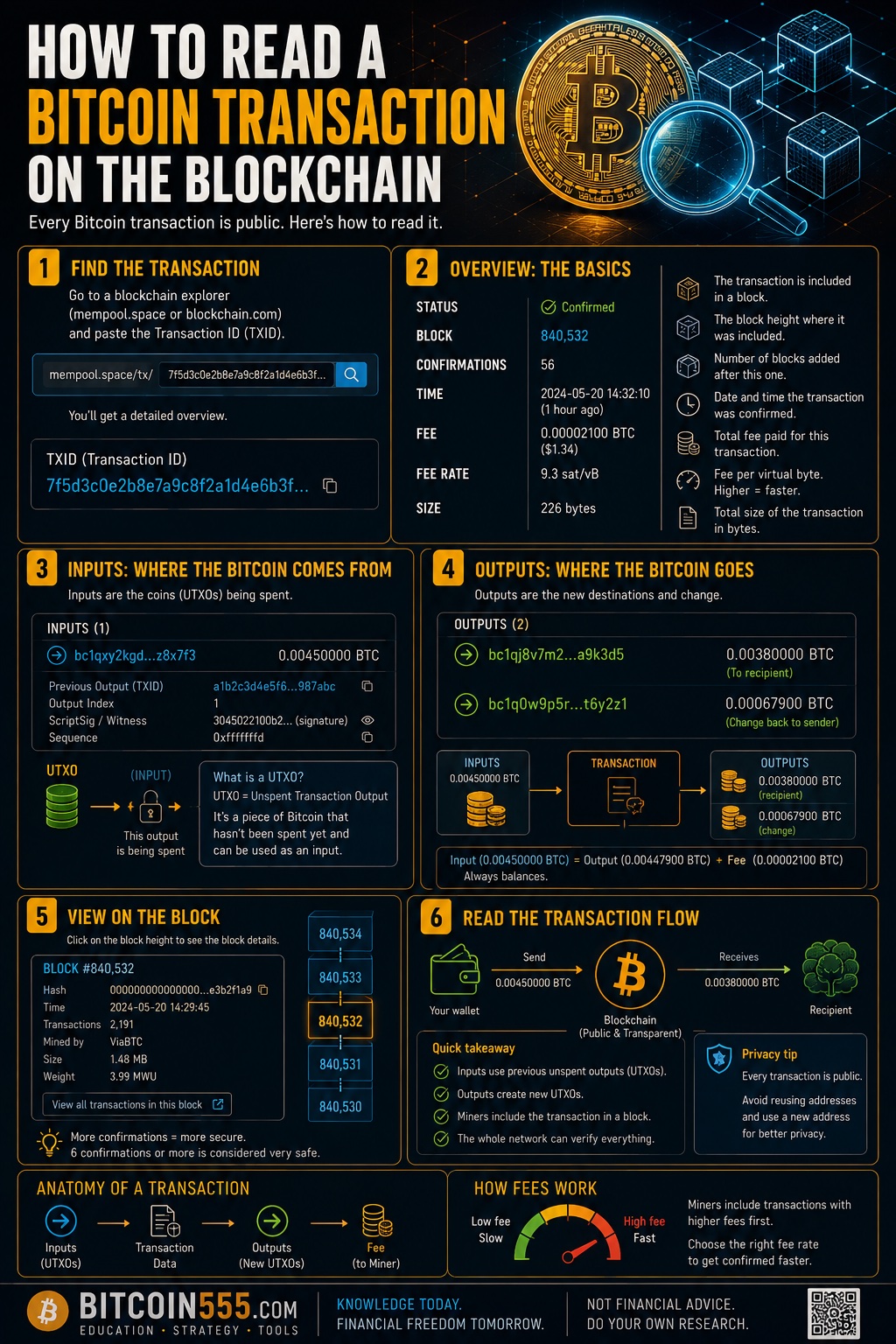
Most Bitcoin wallets display the transaction ID after you send or receive bitcoin. Simply copy this ID and paste it into the search bar of your preferred block explorer. Within seconds, you'll see a detailed breakdown of exactly what happened in that transaction.
Here's a pro tip: bookmark multiple block explorers. If one site is down or running slowly, you can always check another. The beauty of Bitcoin's open data is that anyone can run a block explorer, and they all show the same information because they're all reading from the same blockchain.
Anatomy of a Bitcoin Transaction: Breaking Down Each Component
Let's walk through a typical Bitcoin transaction as it appears on a block explorer. We'll examine each field so you know exactly what you're looking at.
Transaction ID (TXID)
The transaction ID is a unique fingerprint for this specific transaction. It's generated by running the transaction data through a cryptographic hash function (SHA-256, twice). No two transactions will ever have the same TXID, making it perfect for looking up and referencing specific transactions. It looks something like this: 7a8b9c0d1e2f3a4b5c6d7e8f9a0b1c2d3e4f5a6b7c8d9e0f1a2b3c4d5e6f7a8b
Status and Confirmations
The status tells you whether the transaction has been confirmed. You'll typically see:
- Unconfirmed/Pending: The transaction has been broadcast but not yet included in a block
- 1 confirmation: Included in the most recent block
- 6+ confirmations: Generally considered irreversible and fully settled
Each new block added to the chain after your transaction adds another confirmation. For small amounts, 1-3 confirmations are usually sufficient. For larger amounts, waiting for 6 confirmations provides near-absolute certainty that the transaction is permanent.
Inputs
The inputs section shows where the bitcoin came from. Each input references a previous transaction output (called a UTXO—Unspent Transaction Output) that's being spent. You'll see:
- The address that previously held the bitcoin
- The amount associated with that input
- A reference to the previous transaction (by TXID and output index)
If someone is sending you 0.5 BTC but their wallet contains coins from multiple previous transactions (say, 0.3 BTC and 0.25 BTC), the transaction might show two inputs. This is normal—wallets automatically combine multiple smaller amounts to make payments.
Outputs
The outputs section shows where the bitcoin is going. A typical transaction has at least two outputs:
- Payment output: The amount going to the intended recipient
- Change output: The leftover amount returning to the sender
Here's why change outputs exist: Bitcoin transactions must spend entire UTXOs. If you have 1 BTC and want to send 0.3 BTC, you create a transaction with one input (your 1 BTC) and two outputs (0.3 BTC to the recipient and approximately 0.7 BTC back to yourself as change, minus the fee).
Transaction Fee
The fee is calculated as the difference between total inputs and total outputs. This fee goes to the miner who includes your transaction in a block. On block explorers, you'll often see:
- Total fee: The absolute amount paid (e.g., 0.00015 BTC)
- Fee rate: Measured in satoshis per virtual byte (sat/vB)
The fee rate matters because it determines how quickly miners will prioritize your transaction. Higher fee rates get confirmed faster during periods of high network demand.
Size and Weight
You'll see transaction size measured in bytes or virtual bytes (vB). Larger transactions (those with many inputs or outputs) require more data and thus higher fees. The "weight" measurement relates to SegWit, a Bitcoin upgrade that changed how transaction size is calculated to make certain transaction types more efficient.
Step-by-Step: Looking Up Your First Transaction
Let's walk through the practical process of finding and reading a transaction.
Step 1: Get your transaction ID. Open your Bitcoin wallet (whether it's a hardware wallet like Ledger, a mobile wallet, or a desktop wallet). Navigate to your transaction history and click on the specific transaction you want to examine. Look for the TXID or "Transaction Hash."
Step 2: Open a block explorer. Go to mempool.space, blockstream.info, or your preferred explorer. These are trusted, open-source options that don't track your searches.
Step 3: Paste your TXID. Enter the transaction ID in the search bar and hit enter. The explorer will display the full transaction details.
Step 4: Verify the basics. Check that the amounts and addresses match what you expected. Confirm the status shows the appropriate number of confirmations.
Step 5: Examine the details. Look at the inputs to see where the funds came from. Review the outputs to confirm where they went. Check the fee paid and fee rate.
If you've been accumulating bitcoin over time using a consistent strategy, you might have many transactions in your history. Using tools like our DCA calculator can help you track your overall acquisition cost, while the blockchain itself serves as your permanent, auditable record of each individual transaction.
Common Transaction Types and What They Look Like
Not all Bitcoin transactions look the same. Understanding different transaction patterns helps you interpret what you're seeing.
Simple Payment
The most basic transaction type: one input, two outputs. One output goes to the recipient, one returns change to the sender. When you see this pattern, you're looking at a straightforward payment.
Consolidation Transaction
Many inputs, one output (or one main output plus a small change output). This is someone combining multiple smaller UTXOs into a single larger one, often done during low-fee periods to prepare for future spending. If you're using a hardware wallet like Ledger for long-term storage, periodically consolidating your UTXOs during low-fee periods is a smart practice—it reduces the fees you'll pay when you eventually want to spend.
Batch Transaction
One or few inputs, many outputs. Exchanges and businesses use this pattern to pay multiple recipients in a single transaction, saving on overall fees. If you received bitcoin from an exchange, your payment might be one of dozens of outputs in the same transaction.
CoinJoin or Mixing Transaction
Many inputs from different addresses, many outputs of equal (or near-equal) amounts. This pattern indicates a privacy-enhancing technique where multiple users combine their transactions to obscure the connection between inputs and outputs.
Privacy Considerations When Viewing Transactions
The Bitcoin blockchain is public, which means anyone can view any transaction. This transparency is crucial for verifying the network's integrity, but it also has privacy implications worth understanding.
When you look up a transaction on a block explorer, consider:
- Your IP address may be logged: The block explorer can see that someone from your IP looked up a specific transaction. Using Tor or a VPN adds a layer of privacy.
- Address clustering: If a transaction has multiple inputs, those inputs likely belong to the same person, linking those addresses together.
- Change output identification: Experienced analysts can often identify which output is the change (returning to the sender) based on various heuristics.
For maximum privacy, consider running your own Bitcoin node and block explorer. This way, you can look up transactions without revealing your interest to any third party. Many Bitcoin enthusiasts run personal instances of open-source explorers like Mempool.space on their home networks.
When you purchase bitcoin on exchanges like Binance and then withdraw to your personal wallet, that withdrawal transaction creates a public link between the exchange and your personal address. This is one reason why many Bitcoiners use multiple addresses and practice good UTXO management.
Troubleshooting: What to Do When Something Looks Wrong
Sometimes transactions don't behave as expected. Here's how to interpret common situations:
Transaction Stuck Unconfirmed
If your transaction has been pending for hours, check the fee rate. Compare it to current mempool conditions (mempool.space shows this graphically). If your fee is too low, you have options:
- Wait: Eventually, either the transaction confirms or drops from mempools after about two weeks.
- Replace-By-Fee (RBF): If your wallet enabled RBF, you can broadcast a new version with a higher fee.
- Child-Pays-For-Parent (CPFP): Spend the unconfirmed change with a high fee, incentivizing miners to confirm both transactions.
Received Less Than Expected
If someone sent you bitcoin and you received less than they claimed to send, check the transaction. The sender might have deducted the fee from the payment amount rather than paying it additionally. Some wallets and exchanges do this by default.
Unexpected Address Format
Bitcoin addresses come in different formats: Legacy (starting with 1), SegWit (starting with 3 or bc1). All are valid Bitcoin addresses. Modern bc1 addresses (especially bc1q and bc1p) typically result in lower fees.
Frequently Asked Questions
How long does it take for a Bitcoin transaction to confirm?
On average, Bitcoin blocks are mined every 10 minutes, but this can vary significantly. A transaction with an appropriate fee typically confirms within 10-30 minutes. During high-demand periods, low-fee transactions might take hours or even days. Very low-fee transactions might never confirm and eventually expire from node mempools.
Can I cancel a Bitcoin transaction after sending?
Once a transaction is broadcast, it cannot be traditionally "canceled." However, if the transaction is unconfirmed and you enabled Replace-By-Fee (RBF) when sending, you can broadcast a replacement transaction sending the funds back to yourself with a higher fee. Without RBF, your options are limited to waiting or attempting advanced techniques like CPFP.
Why does my transaction show a different amount than I sent?
The inputs in a transaction often total more than the payment amount. The difference goes to change (returned to you) and fees (paid to miners). Some explorers show the total input value prominently, which can be confusing. Focus on the specific output sent to your intended recipient.
Is it safe to share my transaction ID with others?
Sharing a transaction ID allows others to view that specific transaction, including addresses and amounts involved. While this doesn't give anyone access to your funds, it does reveal information about your financial activity. Share TXIDs when necessary for verification but consider the privacy implications.
What happens if I send Bitcoin to the wrong address?
Bitcoin transactions are irreversible. If you send to an incorrect address, the only way to recover funds is if the owner of that address voluntarily sends them back. This is why verifying addresses character-by-character before sending (especially for large amounts) is crucial. Hardware wallets help by displaying the address on a secure screen for verification.
Conclusion
Reading a Bitcoin transaction is like learning to read a new language—once you understand the grammar and vocabulary, the meaning becomes clear. Every transaction tells a story: where the bitcoin came from, where it went, how much was transferred, and when it was confirmed. This transparency is one of Bitcoin's greatest strengths, allowing anyone to audit the entire monetary system without trusting any central authority.
As you become more comfortable reading transactions, you'll develop an intuitive understanding of how Bitcoin actually works. You'll be able to verify your own transactions with confidence, troubleshoot issues when they arise, and understand the technical discussions happening in the Bitcoin community.
Remember: the blockchain is your ultimate source of truth. No matter what any wallet, exchange, or service tells you, you can always verify the actual state of your bitcoin by checking the blockchain directly. This is what "don't trust, verify" really means in practice.
Take some time to explore the blockchain using the techniques in this guide. Look up some of your old transactions. Examine a random block. The more you explore, the more natural it becomes. And that understanding is the foundation of true financial sovereignty.