If you've accumulated any meaningful amount of Bitcoin, you've probably heard the mantra: not your keys, not your coins. This simple phrase encapsulates one of the most important lessons in cryptocurrency—keeping your Bitcoin on an exchange or hot wallet exposes you to hacking, platform failures, and custodial risks. The solution? A hardware wallet.
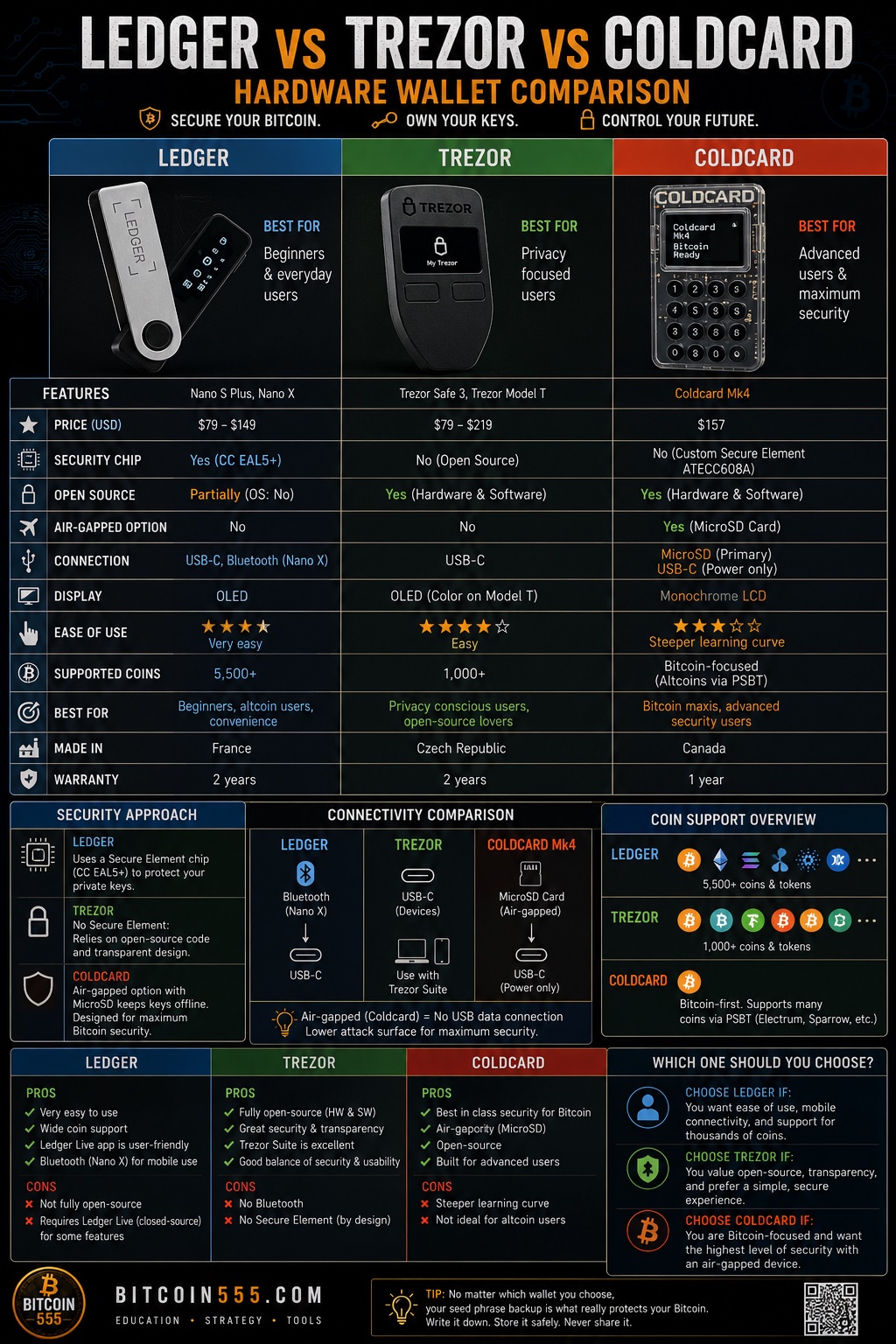
But choosing the right hardware wallet isn't straightforward. Three names dominate the conversation: Ledger, Trezor, and Coldcard. Each has passionate advocates and distinct philosophies about security, usability, and what Bitcoin holders actually need. After years of using all three and helping countless newcomers secure their holdings, I've developed a nuanced view of which device suits different types of users.
In this comprehensive comparison, we'll examine each wallet's security architecture, ease of use, supported features, and ideal use cases. By the end, you'll have a clear understanding of which hardware wallet deserves a place in your security setup—or whether you might need more than one.
Understanding Hardware Wallets: Why They Matter
Before diving into specific devices, let's establish why hardware wallets exist in the first place. When you hold Bitcoin, you're really holding private keys—cryptographic secrets that prove ownership and authorize transactions. These keys are just strings of characters, but they represent real value. If someone obtains your private keys, they can steal your Bitcoin instantly and irreversibly.
Software wallets on your phone or computer are convenient, but they're vulnerable. Malware, keyloggers, screen capture software, and remote access trojans can all compromise your keys. Even if you're careful, operating systems have countless attack surfaces.
Hardware wallets solve this by generating and storing your private keys on a dedicated device that never exposes them to your computer. When you want to send Bitcoin, you create the transaction on your computer, but the actual signing happens on the hardware wallet. Your private keys never leave the device. Even if your computer is completely compromised, attackers cannot steal your keys.
This air gap between key storage and internet connectivity is what makes hardware wallets the gold standard for self-custody. Now let's see how our three contenders implement this concept differently.
Ledger: Mainstream Security with Multi-Asset Support
Ledger, the French company behind the Ledger Nano series, has shipped millions of devices worldwide, making it arguably the most recognized hardware wallet brand. Their flagship products—the Ledger Nano S Plus and Ledger Nano X—use a secure element chip, similar to what you'd find in credit cards and passports.
Security Architecture
The secure element is Ledger's defining security feature. This certified chip (CC EAL5+) is designed to resist physical attacks, including attempts to extract data by probing the chip or analyzing its power consumption. Even if someone steals your device, extracting the private keys from the secure element is extraordinarily difficult without knowing your PIN.
Ledger uses a proprietary operating system called BOLOS that runs applications in isolation. Each app (Bitcoin, Ethereum, etc.) operates in its own sandbox, reducing the risk that a vulnerability in one app could compromise another.
However, Ledger's closed-source firmware has drawn criticism from privacy advocates. You cannot independently verify what code runs on your device, requiring trust in Ledger's security claims. The company has also faced controversy over optional features that some users find concerning, though the core signing functionality remains offline and secure.
User Experience
Setting up a Ledger device is straightforward. You connect it to your computer or phone, install Ledger Live (the companion software), and follow the prompts to generate your 24-word recovery phrase. The interface guides you through each step, making it accessible even for complete beginners.
The Ledger Nano X includes Bluetooth connectivity, allowing wireless use with mobile phones—a genuine convenience upgrade for regular transactions. The Nano S Plus sticks to USB-only but offers more storage for apps at a lower price.
Ledger Live provides a polished experience for managing multiple cryptocurrencies, checking balances, and installing apps. If you hold assets beyond Bitcoin, this ecosystem approach is genuinely useful.
Best For
Ledger works exceptionally well for users who want one device for multiple cryptocurrencies, appreciate mobile connectivity, and prioritize a polished user experience. It's also widely supported by third-party wallets and DeFi applications, making it versatile for various use cases beyond simple holding. For anyone serious about security who wants broad functionality, Ledger offers a compelling balance of protection and convenience.
Trezor: Open Source Pioneer with Transparent Security
Trezor created the hardware wallet category in 2014, and the Czech company SatoshiLabs continues developing devices with an open-source philosophy. The Trezor Model One and Trezor Model T (plus the newer Safe series) offer fully auditable firmware that security researchers can verify independently.
Security Architecture
Unlike Ledger, Trezor devices use standard microcontrollers rather than secure elements. This design choice reflects a different security philosophy: transparency over hardware certification. Because Trezor's firmware is completely open source, anyone can review it for vulnerabilities or backdoors.
The trade-off is that without a secure element, Trezor devices are theoretically more vulnerable to sophisticated physical attacks. An attacker with physical access, specialized equipment, and sufficient expertise could potentially extract seeds from some Trezor models through voltage glitching or other techniques.
However, this threat model matters mainly for targeted attacks. Most Bitcoin holders face far greater risks from phishing, malware, and poor operational security than from nation-state-level physical attacks. Trezor mitigates physical risks through passphrase protection—an optional additional word that creates entirely separate wallet instances.
User Experience
Trezor devices connect via USB (some models support USB-C) and work through the Trezor Suite web and desktop application. The setup process is intuitive: connect, follow the prompts, write down your seed phrase, set a PIN, and you're ready.
The Model T features a color touchscreen, making seed entry and confirmation happen entirely on the device—your sensitive information never touches your computer keyboard. The Model One uses physical buttons and displays your seed on the device screen while you write it down.
Trezor Suite handles Bitcoin exceptionally well, with features like coin control, replace-by-fee, and Tor integration built in. For Bitcoin-focused users, it's a genuinely excellent interface.
Best For
Trezor appeals to users who value open-source transparency, want confidence that no hidden code could compromise their device, and primarily focus on Bitcoin. The community can audit everything, which provides a different kind of security assurance than hardware certifications.
Coldcard: Maximum Security for Bitcoin Purists
Coldcard, made by Canadian company Coinkite, takes an uncompromising approach to Bitcoin security. It supports only Bitcoin—no altcoins, no apps, no Bluetooth. This deliberate limitation reflects a philosophy that complexity is the enemy of security.
Security Architecture
Coldcard combines the best of both worlds: a secure element chip (ATECC608A) for key storage plus fully open-source firmware for transparency. This dual approach addresses criticisms of both Ledger (closed source) and Trezor (no secure element).
But Coldcard goes further with features designed for serious Bitcoiners:
- Air-gapped operation: You never have to connect Coldcard to a computer. Transactions can be signed via microSD card, creating a true air gap.
- Duress PIN: Enter a special PIN under duress to reveal a decoy wallet with a small balance, while your real funds remain hidden.
- Brick Me PIN: Permanently destroy the device if entered—useful if you face serious physical threats.
- Countdown to login: Require a delay before login, allowing you to detect and respond to tamper attempts.
The device also supports advanced multisig setups, making it popular for institutional custody and high-security personal configurations.
User Experience
Let's be honest: Coldcard isn't designed for beginners. The interface uses a small screen and numeric keypad that takes getting used to. Initial setup involves more steps and decisions than consumer-focused alternatives.
However, this complexity reflects the depth of configuration available. Power users appreciate the control—you can customize nearly every aspect of how the device operates. The air-gapped workflow using PSBT (Partially Signed Bitcoin Transactions) files is elegant once you understand it.
Coldcard works with major Bitcoin wallets like Sparrow, Electrum, and Specter, giving you flexibility in your software choices. There's no proprietary companion app required.
Best For
Coldcard is ideal for Bitcoin maximalists, privacy enthusiasts, users holding significant amounts, and anyone building sophisticated multisig setups. If you want maximum security and don't mind a steeper learning curve, Coldcard delivers capabilities no other hardware wallet matches.
Head-to-Head Feature Comparison
Let's break down the key differences in a practical way:
Security Features
Ledger offers secure element protection with CC EAL5+ certification, but closed-source firmware requires trusting the company. Trezor provides complete code transparency but uses standard chips vulnerable to sophisticated physical attacks. Coldcard combines secure element hardware with open-source firmware, plus unique features like air-gapped operation and duress PINs.
Cryptocurrency Support
Ledger supports thousands of assets across multiple blockchains. Trezor supports hundreds of cryptocurrencies through its firmware. Coldcard supports Bitcoin only—by design.
Ease of Use
Ledger provides the most polished consumer experience with Ledger Live. Trezor offers intuitive setup and clean interfaces through Trezor Suite. Coldcard requires more technical knowledge but rewards users with granular control.
Price Range
Entry-level devices from Ledger and Trezor start around $79-99. Premium models with touchscreens cost $149-219. Coldcard positions itself in the premium segment at $150+, reflecting its specialized capabilities.
Connectivity
Ledger Nano X offers Bluetooth for mobile use. Trezor devices use USB connections. Coldcard can operate completely air-gapped using only microSD cards.
Setting Up Your First Hardware Wallet: Step-by-Step
Regardless of which wallet you choose, certain principles apply universally. Here's how to approach your first setup correctly:
Before You Start
- Purchase directly from the manufacturer. Never buy hardware wallets from Amazon, eBay, or other third parties. Tampered devices can steal your funds.
- Verify the package is sealed. Each manufacturer uses tamper-evident packaging—inspect it carefully.
- Set aside uninterrupted time. Don't rush through setup. Plan for 30-60 minutes in a private space.
During Setup
- Generate your seed phrase on the device. Never accept a pre-filled seed or generate one on a computer.
- Write your recovery phrase on paper or metal. Never store it digitally—no photos, no cloud storage, no password managers.
- Verify every word. Most devices make you confirm your seed. Take this seriously.
- Set a strong PIN. Use the maximum length allowed. This protects against casual physical access.
- Consider a passphrase. An additional word creates a completely separate wallet. Even if someone finds your seed, they can't access funds without the passphrase.
After Setup
- Test your backup. Send a small amount, then verify you can restore the wallet from your seed phrase using another device or software wallet. Never skip this step.
- Document your setup. Write down which wallet you used, derivation paths, and passphrase hints (not the passphrase itself) for future reference.
- Store your backup securely. Consider geographic distribution—one copy at home in a fireproof safe, another at a trusted location.
Buying Bitcoin to Secure on Your Hardware Wallet
Once you've set up your hardware wallet, you'll need Bitcoin to store on it. Most users purchase through exchanges, then withdraw to their hardware wallet address.
Major platforms like Binance offer straightforward processes: verify your identity, deposit funds, purchase Bitcoin, then withdraw to your hardware wallet's receiving address. Always double-check the address on your hardware wallet's screen before confirming—don't trust what your computer displays alone.
For larger purchases, consider splitting withdrawals across multiple transactions rather than moving everything at once. This limits exposure if something goes wrong and lets you verify the process works correctly with smaller amounts first.
Frequently Asked Questions
Can hardware wallets be hacked?
No security is absolute, but hardware wallets provide extremely strong protection. Remote hacking is essentially impossible since private keys never touch the internet. Physical attacks exist in theory but require expensive equipment, physical access, and expertise. For most users, hardware wallets reduce risk by orders of magnitude compared to software alternatives.
What happens if I lose my hardware wallet?
Your funds remain safe as long as you have your recovery seed phrase. You can purchase a new device (same brand or different) and restore your wallet completely. This is why protecting your seed phrase is more important than protecting the device itself.
Should I use multiple hardware wallets?
Many serious Bitcoiners use multiple devices—perhaps a Ledger for convenient everyday transactions and a Coldcard for long-term cold storage. You can also use multiple devices to create multisig setups requiring several signatures to move funds, dramatically increasing security.
How often should I update hardware wallet firmware?
Apply updates when they include security fixes, but don't update immediately upon release. Wait a few days to see if issues emerge. Always verify you can restore from your seed before updating, as updates occasionally have problems.
Is one hardware wallet enough for all my Bitcoin?
For most individuals, a single hardware wallet with a passphrase provides excellent security. For larger holdings, consider multisig configurations using two or three different hardware wallets, eliminating single points of failure.
Conclusion: Choosing Your Hardware Wallet
The best hardware wallet depends on your specific needs, technical comfort, and what you're securing.
Choose Ledger if you want polished software, mobile connectivity, and support for multiple cryptocurrencies alongside Bitcoin. It's the most user-friendly option for those entering the hardware wallet world who value convenience alongside security.
Choose Trezor if open-source transparency matters to you, you're comfortable with the physical attack trade-offs, and you appreciate a clean interface with solid Bitcoin features. It strikes a nice balance between accessibility and verifiability.
Choose Coldcard if you're a Bitcoin-only holder prioritizing maximum security, want air-gapped operation, or need advanced features like duress PINs and sophisticated multisig support. The learning curve is real but worthwhile for serious holdings.
Ultimately, any of these three options represents a massive security upgrade over keeping Bitcoin on exchanges or in software wallets. The most important step is starting—pick a reputable device, set it up correctly, protect your seed phrase, and take control of your own keys. Your future self will thank you.